Launching soon. Join the Discord to hear the moment checkout opens.
WildWulff wolf logo
WildWulffPackLink
For trade rooms, signal providers and the packs that follow them

Trade alerts, a trade journal
and auto‑copy, in one app.

Founding member offerLaunch list now open

Get 20% off your first 3 months

Join the PackLink launch list. You'll get your founding member discount and be first to know when checkout opens.

No spam. One email when checkout opens, plus launch updates. Unsubscribe anytime.

Built for signal providers and the traders who follow them. Works with MotiveWave, NinjaTrader 8, Quantower and more, on Windows and Mac.

See plans · Ask a question on Discord · Cancel anytime
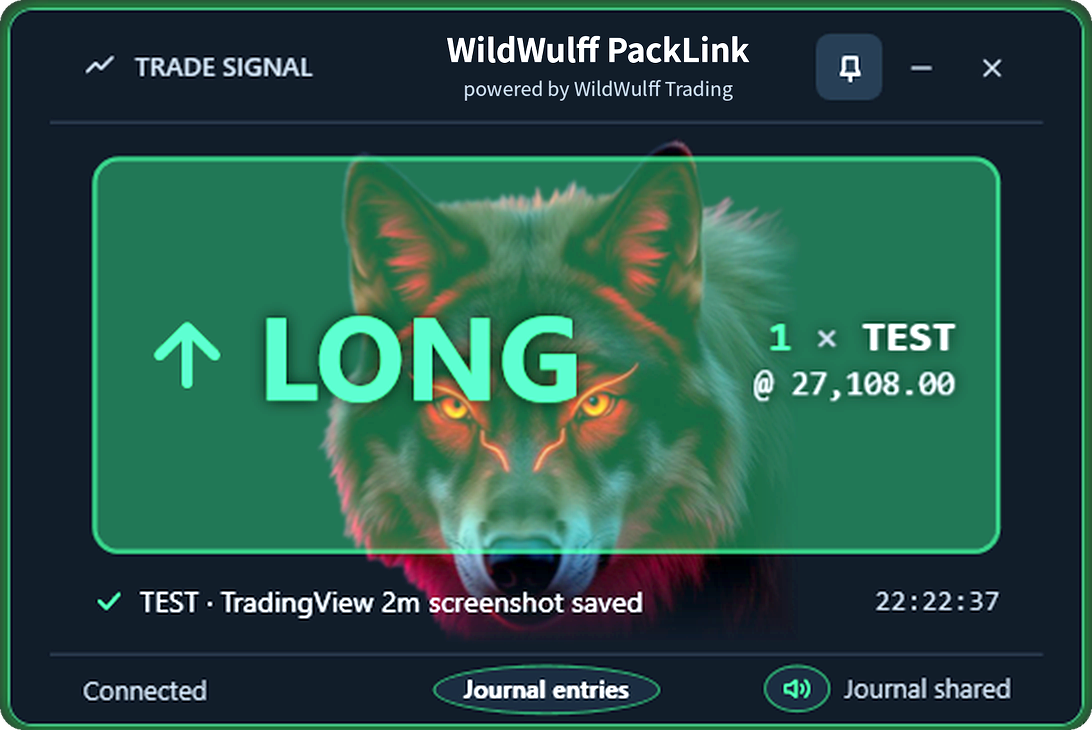
Live alertsLong / Short, with sound
Screenshot journalEntry, adds and exit
Auto-CopyOn Pro plans
7 platformsWindows and Mac
Who it's for

From one-on-one mentorships to full trading firms,
we connect you.

Whether you're a mentor guiding a single retail trader, a trade room sharing calls with its members, or a firm running a desk of traders, PackLink puts everyone on the same trade at the same moment, with a shared record of every entry and exit.

Mentorships

One mentor, one student. Your student sees every trade you take, live, with the chart saved for your next review session.

Trade rooms

Signal providers and their members. Every call reaches every screen the moment it fills. No more chasing entries in chat.

Trading firms

Desks and prop teams. One lead trader, many seats, the same alerts and one shared journal across the whole floor.

How it works

One install. Pick your role. You're linked in minutes.

01

The provider trades

Trade the way you already do on your platform. PackLink sends each entry, add, trim and exit to your channel the moment it fills.

02

Followers see it instantly

A Long or Short alert pops up with a sound on every follower's computer. No checking chat, no lag, no missed calls.

03

Every trade is on record

PackLink grabs a TradingView screenshot at the entry, each scale-in and the exit, and files it in a shared trade journal anyone in the pack can review.

Works with
MotiveWaveNinjaTrader 8QuantowerSierra ChartBookmapMetaTrader 5cTrader
Built for trade rooms and desks

One provider. Every screen in the room.

Run a trade room, a prop desk or a small group of friends who trade together? Enterprise plans put your whole room on one shared key, so every follower sees the same alert at the same moment and the same trade lands in the same journal.

10computers on one key
7trading platforms
2ways to Auto-Copy
See it in action

The alert hits. The record writes itself.

The moment your provider's order fills, a Long or Short alert lands on every screen in the pack. At the same time PackLink captures the TradingView chart, so every entry, scale-in and exit is on file for review later.

Your pack's edge

The best setups don't wait for anyone to read chat. PackLink is built around three things that matter when the market moves.

Speed

Alerts go out the moment the provider's order fills, with a sound, on every follower's screen. No copying calls out of a chat window.

A real record

Every entry, scale-in and exit is captured with a chart screenshot in a journal the whole pack can review. See exactly what was traded and when.

Control

Pro followers choose: copy the provider exactly with a daily loss cap, or set their own size, stop, loss limit and hours.

Pro plans

Auto-Copy into your own account

Followers on a Pro plan can have the provider's trades placed in their own trading account automatically. One switch decides who's in charge:

  • Provider-managed (default): exact size, every add and exit, as the provider trades it. You set one safety net: a max dollar loss per day.
  • My own limits: your size, your stop, your daily loss limit and your trading hours.
Built to run quietly

Set it up once

  • Works on Windows and Mac, with the same features on both.
  • Starts with your computer and stays out of the way.
  • Updates install themselves, and each one is signed so only genuine updates run.
  • Your license key covers 2 or 10 computers, depending on your plan.
  • Real people answer support in Discord.

Plans

Every plan works as a Signal Provider, a Follower, or both. Enterprise plans let a provider run a whole room on one key. Pay monthly, or pay ahead and save. Cancel anytime.

Individual

$49 /month
$468/year (about $39/mo)
  • 2 computers
  • Live trade alerts
  • TradingView screenshot journal
  • Windows and Mac
Get Individual

Pro

Most popular
$99 /month
$1,068/year (about $89/mo)
  • 2 computers
  • Everything in Individual
  • Auto-Copy into your account
  • Provider-managed or your own limits
Get Pro

Enterprise

$299 /month
Intro offer: $2,500/year (about $208/mo)
  • Your own trade room: 1 provider + 9 followers
  • 10 computers on one shared key
  • Everything in Individual
Get Enterprise

Enterprise Pro

$599 /month
$1,602 every 3 months (about $534/mo)
  • Your own trade room: 1 provider + 9 followers
  • Auto-Copy for every follower
  • Everything in Pro
Get Enterprise Pro

Questions

What platforms does it work with?

MotiveWave, NinjaTrader 8, Quantower, Sierra Chart, Bookmap, MetaTrader 5 and cTrader. The PackLink app runs on Windows and Mac, and screenshots are taken from your TradingView window.

Does PackLink give me trade signals?

No. PackLink doesn't pick trades. It shares the trades of the provider you connect to, in real time. The quality of the signals is up to your provider.

Do I need to be a signal provider?

No. You choose your role at install: Signal Provider, Follower, or both. Followers connect to a provider's channel to get their alerts.

Is Auto-Copy safe to turn on?

You stay in control. In provider-managed mode you set a max dollar loss for the day. If it's reached, PackLink closes the position and stops copying until the next day. In your-own-limits mode, you set size, stop, daily loss and hours. Try it on a sim account first, and if you trade a prop firm account, check your firm's rules on copying trades.

How do I get my license and support?

After checkout you get your license key and downloads, plus access to the private customer channels in our Discord for setup help, support and update news.

Can I cancel?

Yes, anytime. Your license stays active until the end of the period you paid for.

Link your pack.

Join the Discord to see it in action and ask anything before you buy.